Windows desktop AI tutor for KiCad
The AI tutor that lives beside KiCad.
It sits on your desktop next to KiCad, watches what you are doing, reads your live board, and explains PCB design one clear step at a time — from your first schematic to your first fabricated order.
You are on a phone right now. Open this page on your Windows 10 or 11 PC to download and install it — there is nothing to run on a phone.
digitalkaos.tech/kiclad
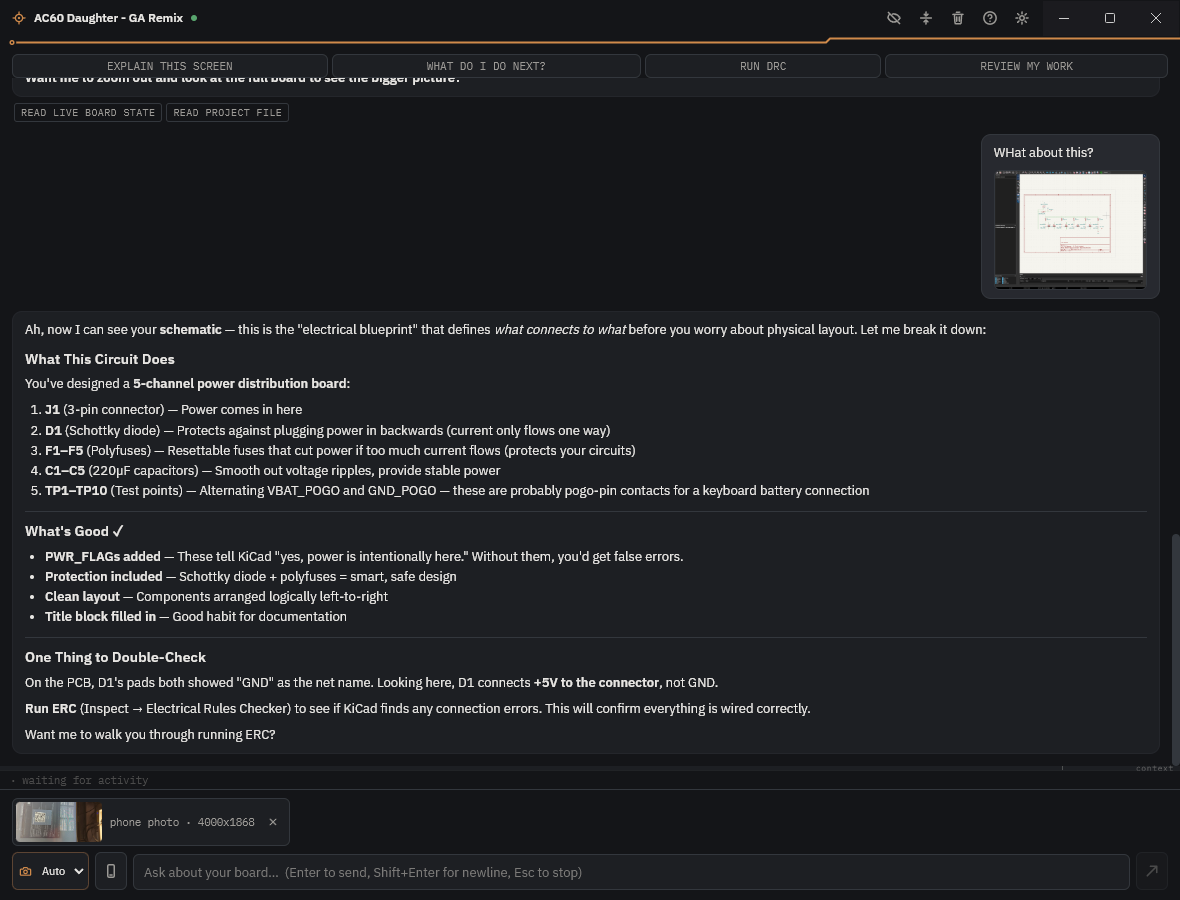
Beginner mode reading a live power-distribution board — schematic, board state, and a bench photo, all in one thread.
What it does
KiClad is not a chat window off to the side. It reads the actual board in front of you, runs the same checks KiCad runs, and — when you say so — makes real edits.
Capture the active window and KiClad reads your schematic or layout exactly as it sits — no describing it in words.
Through KiCad’s own IPC API it pulls real nets, footprints, and refdes from the open project — not a stale export.
KiClad triggers KiCad’s design-rule and electrical-rule checks, then walks you through every violation in plain language.
When you are ready, KiClad proposes edits and applies them — but every change asks for your approval and writes a backup first.
Drag in a screenshot, paste a schematic, or send a phone photo of the physical board on your bench — KiClad reads them all.
Turn on a gentle over-the-shoulder mode and KiClad only speaks up when it spots something worth a heads-up. Off by default.
Pick your tutor
Set your skill level once in Settings and KiClad changes how much it explains — from full hand-holding to a straight peer review. You can bump it up any time.
New to KiCad, or to PCBs entirely. KiClad walks you through everything, one step at a time, and explains the why.
You can drive KiCad. KiClad skips the hand-holding but still teaches the reasoning behind schematics and layout.
You know what you are doing. KiClad reviews like a peer — mistakes, risks, and advice, no lectures.
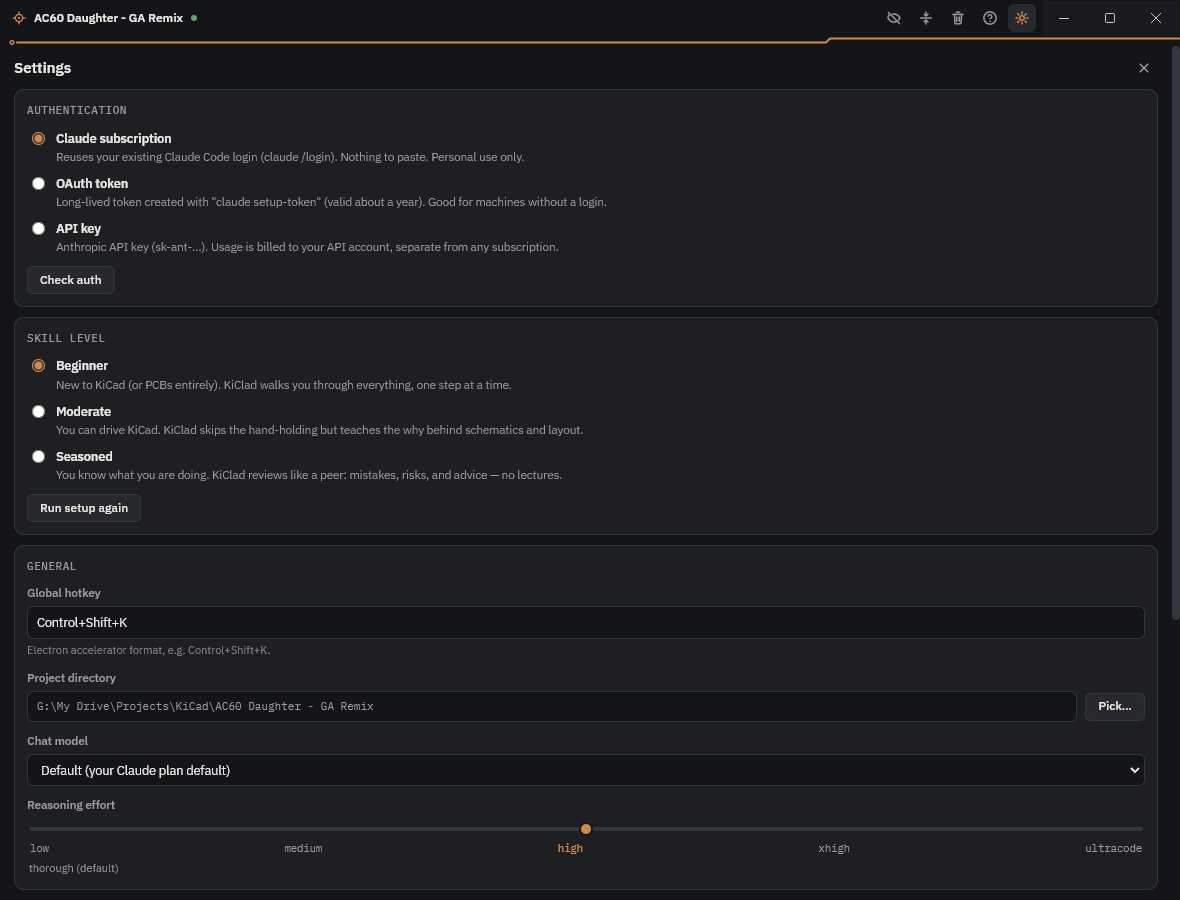
Settings — authentication, skill level, and the reasoning-effort slider.
What you need
No account to make with us, no subscription to KiClad. Here is exactly what has to be on your machine, and why.
KiClad is a native Windows desktop app. It installs beside KiCad and stays out of the way until you call it.
The free, open-source PCB tool KiClad teaches. The live-board features use KiCad’s built-in IPC API.
Two ways in. With a Claude Pro or Max subscription, KiClad reuses your Claude Code sign-in — nothing to paste.
Otherwise, use any Anthropic account plus an API key: create one at console.anthropic.com and add a few dollars of credit.
A small local sidecar bridges KiClad to KiCad’s live board. The installer sets it up for you in one guided step.
Where the money goes. KiClad itself is free forever. The AI runs on your own Claude account, so your board data and your usage costs stay yours — we never sit in the middle and we never bill you.
How to use it
Each step builds on the last — start at the top and you are running Fix Mode by the end.
Run KiClad-Setup-2.1.4.exe. It installs the app and offers to set up the Python sidecar in the same pass.
Point KiClad at your Claude account, pick a skill level, and confirm it can see KiCad. One screen, a couple of minutes.
Press Ctrl + Shift + K from anywhere, or use a quick action like Explain this screen, What do I do next?, Run DRC, or Review my work.
Paste a schematic, drop a screenshot, or snap a phone photo of the physical board on your bench. KiClad reads all three.
Once you trust its suggestions, let KiClad make the edits — approving each one, with a backup written before every change.
Installing on Windows
The first time you run the installer, Windows shows a blue “unrecognized app” screen. It looks alarming, but it is a publisher check, not a virus warning — the same screen every brand-new independent app gets. Here is exactly what it means, the two clicks to get past it, and how to prove the download is untouched.
Microsoft Defender SmartScreen prevented an unrecognized app from starting. Running this app might put your PC at risk.
1 More infoTwo clicks and you are in: More info → Run anyway. The App and Publisher lines and the Run anyway button only appear after step 1 — that is the only thing the first screen hides.
SmartScreen is only saying the installer has not paid for a code-signing certificate yet — not that it found anything harmful. A new indie app with few downloads always lands on this exact screen; the warning fades on its own as more people install it.
Every release publishes a SHA-256 fingerprint. Run one command; if it matches the value below, your download is byte-for-byte the file published here, with nothing slipped in along the way.
KiClad stays on your machine — no servers, no telemetry, no account with us. It reads and explains only; it never edits a file unless you switch on Fix Mode and approve each change, with a backup written first. More in Privacy & principles.
In PowerShell, from the folder you saved it in:
Get-FileHash .\KiClad-Setup-2.1.4.exe
The value it prints under Hash should match this exactly:
DFA32ECDAC9001BC3DD4D60C2DE311673190D98DED600179475F2E77C4BA0132
No PowerShell? In Command Prompt run certutil -hashfile KiClad-Setup-2.1.4.exe SHA256 and compare the same value.
Bottom line. The warning is about a missing signature, not about safety. Running KiClad does no harm to your PC, your projects, or your files — it stays on your machine, keeps your data yours, and never changes a thing without your approval.
Privacy & principles
KiClad was built at the bench, for the bench. That shapes how it handles your work.
FAQ
Yes. KiClad the app is free forever — no paywall, no trial that expires. The only cost is the AI itself, which runs on your own Claude account, so you pay Anthropic directly (or nothing extra, if you already have a Claude Pro or Max subscription). If KiClad saves you a headache, there is a coffee tip jar, entirely optional.
By default KiClad only reads and explains — it cannot touch your files. Editing happens only in Fix Mode, which you turn on deliberately. Even then, every single change asks for your approval and writes a backup of the file before applying, so you can always roll back.
No. That blue Microsoft Defender SmartScreen screen appears for any new independent app that has not bought a code-signing certificate yet — it is a publisher check, not a virus warning. Click More info, then Run anyway. If you want to be certain the file is untouched, the Installing on Windows section lists a SHA-256 fingerprint you can verify in one command.
KiClad has no AI of its own and no servers — it is a friendly front end that talks to Claude on your behalf. Using your own account is what keeps your board data and your costs yours: nothing routes through us. Bring a Claude Pro or Max subscription (nothing to paste) or any account plus an API key from console.anthropic.com.
Not yet. KiClad is a Windows 10/11 desktop app today. Mac and Linux are things we would like to do, but there is no date to promise — and we would rather under-promise than list a platform that is not truly supported.
Partly. You can always chat, paste screenshots, and ask general PCB questions with KiCad closed. The live-board features — reading nets and footprints, running DRC and ERC, Fix Mode — need KiCad open with your project loaded, since that is where the real board lives.
 KiClad